
Early development · alpha
A tiny web panel for your Minecraft server on a Raspberry Pi.
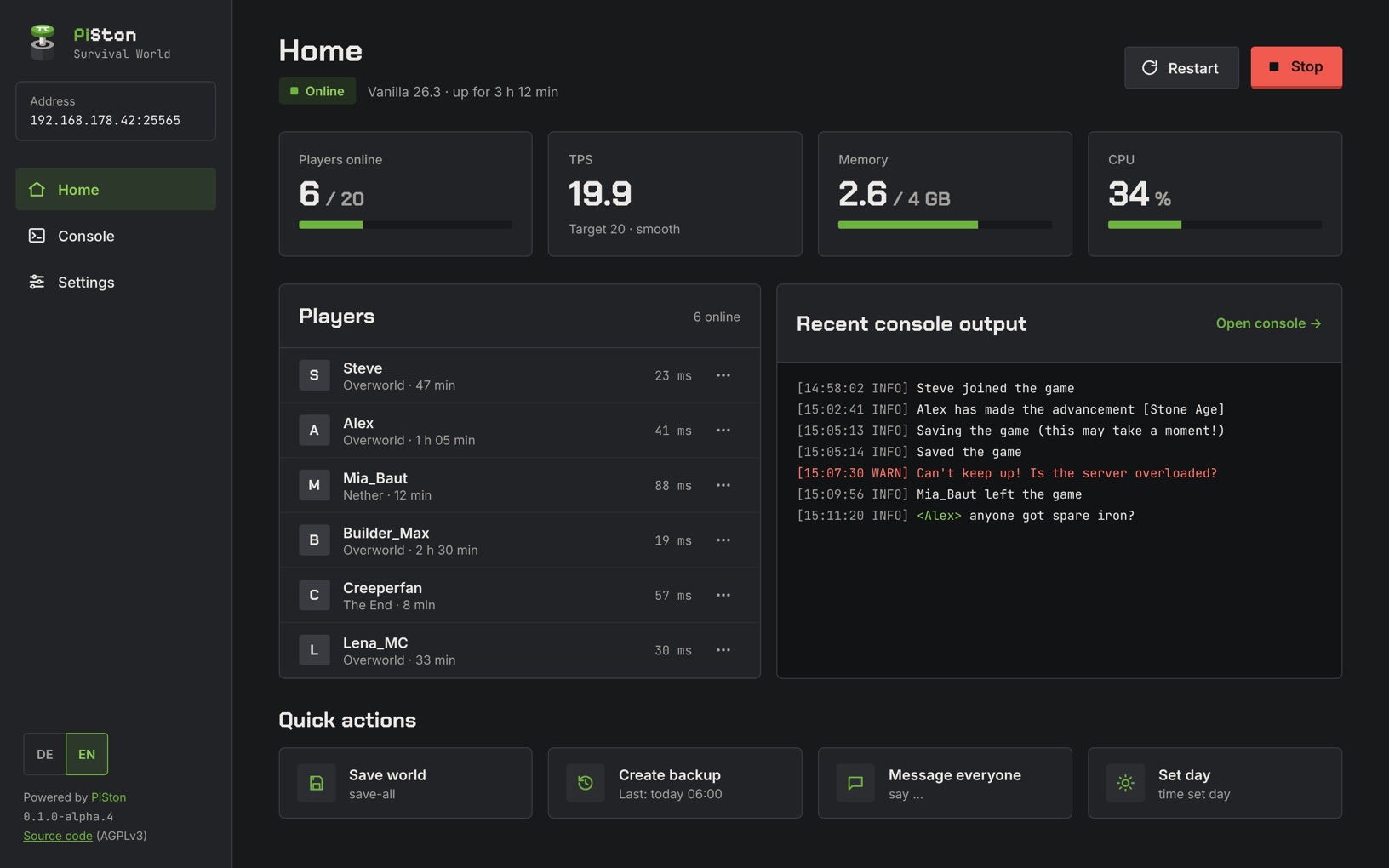
Start and stop, follow the console, manage players and settings – from any browser in your home network.
[18:04:17 INFO] Done (3.214s)! For help, type "help"
[18:12:40 INFO] Steve joined the game
[18:13:02 INFO] <Alex> anyone got spare iron?
> list
There are 6 of a max of 20 players online: Steve, Alex, Mia_Baut, Builder_Max, Creeperfan, Lena_MC
> tps
Target tick rate: 20.0 per second. Average time per tick: 12.4 ms
Try: help · list · tps · say hi
- 01 / memory Lightweight optimized for low memory usage – the RAM stays with your server
- 02 / stack Python + Java all it needs – no Node, no build step, no database
- 03 / network LAN only runs offline at home – no cloud, no account
/ features
Everything a small server needs. Nothing it doesn’t.
Built for one server and a handful of friends – not for hosting companies.
-
Server control
Start, stop and restart with one click – no SSH session needed.
-
Live console
Follow the server log in real time, filter it and send commands.
-
Players
See who is online and manage whitelist, ops and bans.
-
Settings
Edit server.properties in a clear form – validated, comments kept.
-
Version switching
Vanilla, Paper or Fabric – with a checksum check and a world backup first.
-
Metrics
Players, TPS, memory and CPU of your server at a glance.
/ how it works
Your browser talks to PiSton. PiSton talks to your server.
-
01
Browser
Any phone, tablet or PC in your home network.
- HTTP + WebSocket
-
02
PiSton on your Pi
A small Python service. Serves the panel and keeps the RCON password to itself.
- RCON · latest.log
-
03
Minecraft server
Your Java server, unchanged. Commands go via RCON, output is read from latest.log.
/ made for a pi
Small enough to share the Pi with your server.
The panel stays out of the way, so the game gets the memory and CPU.
-
Lightweight
Built to keep RAM usage low. One dependency besides Python.
-
No build step
Plain HTML, CSS and JavaScript. Copy the folder, done.
-
Works offline
Fonts and assets ship with it. No CDN, no tracking, no account.
-
Accessible
Built towards WCAG 2.2 AA – keyboard, screen readers, clear contrast.
/ roadmap
Frontend done. Backend next.
The panel UI is finished and runs on sample data in the demo. Next, a small Python backend connects it to a real server – page by page.
-
01 Done
Panel UI
Home, console and settings – built first with sample data. Try them in the demo.
-
02 Done
Polish
Loading and error states, narrow screens, accessibility and the EULA confirmation.
-
03 In progress
Backend foundation
A Python service with aiohttp, the configuration and a server.properties parser that keeps your comments.
-
04 Planned
Live console
An own RCON client for commands and the live latest.log over WebSocket.
-
05 Planned
Live home
Real status, players, TPS, RAM and CPU. Start, stop and restart via systemd.
-
06 Planned
Live settings
Save server.properties and manage whitelist, operators and bans.
-
07 Planned
Version switching
A world backup first, then Vanilla, Paper or Fabric – downloaded with a checksum check.
-
08 Planned
First release
A systemd service and an installation guide – PiSton 0.1.0.
/ after the first release
- One-line installer Sets up PiSton on your Pi with a single command.
- Update notice The panel tells you when a new release is out – and can be switched off.
- IP bans Ban by address, not only by player name.
/ open source
Free and open source under AGPL-3.0.
Read the code, follow the progress and report issues on GitHub. PiSton is in early development – the demo runs with sample data.
/ install